Maturity Factor
An org-wide scaling knob (default 0.75) that adjusts the ceiling on every P90-based score so the tier distribution fits your organization’s actual AI maturity.
- Family
- Adoption & Agentic (org-level setting)
At a glance
The Maturity Factor is a single number from 0.01 to 1.00 that scales every P90-normalized score in the dashboard. At its default of 0.75, a developer at the org’s 90th percentile scores 75 — leaving headroom to grow into the Power User band (≥80). At 1.00, the same developer would score 100, and a much larger chunk of your team would land in Power User. The setting exists so you can match the tier ceiling to where your org actually is in its AI rollout.
It is the single most consequential admin setting in the product. Changing it shifts the entire tier distribution for everyone in your org overnight, so it should be discussed before you change it.
Formula
ScoreAfterMaturity = ScoreBeforeMaturity × MaturityFactor

Applied to:
  Adoption    = min(Primary + 0.25 × Cursor, 100) × MaturityFactor
  Agentic     = min(intensity / OrgP90, 1.0) × 100 × MaturityFactor
  OutputNorm  = min(devRate / OrgP90Rate, 1.0) × 100 × MaturityFactor
How GitKraken Insights applies it
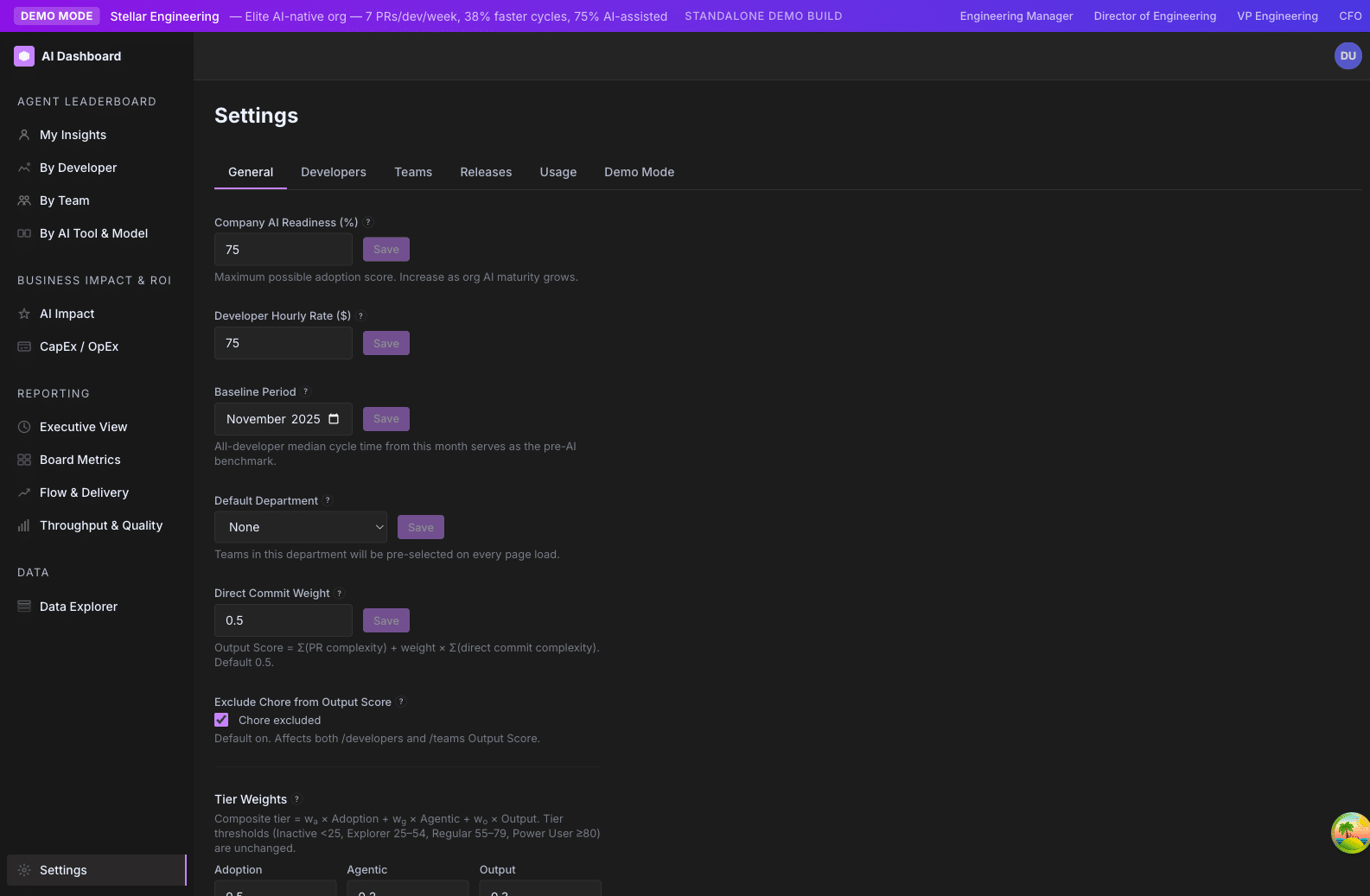
It is not calculated — it is set. Admins choose a value in Settings → General under the label “Company AI Readiness %”.
The setting is stored in the app_settings table as maturity_factor. The backend reads it dynamically and threads it through every score computation. If the setting is absent or invalid (outside [0.01, 1.0]), the default 0.75 is used.
There is no per-team, per-developer, or per-page override. It is one value, applied uniformly.
Why it matters
P90-based scoring has a built-in problem: if you anchor the top of the scale to the org’s 90th percentile, then the top 10% of developers always score 100, regardless of actual maturity. That is fine if your org is mature and your top 10% genuinely are world-class AI users. It is misleading if you are 6 months into a rollout and your top 10% are just slightly less Emerging than everyone else.
The Maturity Factor solves this by saying: “at our current org maturity, even a P90 developer only deserves a 75 — we are not at the ceiling yet.” As the org matures, raise the factor toward 1.0 to reflect that the bar has genuinely been reached.
It is the dial that prevents premature “everyone is a Power User!” inflation in early rollouts, and the dial that lets you eventually retire the artificial ceiling once your org has earned the top tier.
How to read it
- 0.50 – 0.65“We are early. Most of our team is still adopting. The Power User band should be hard to reach.”
- 0.70 – 0.80“We are in active rollout. The top tier is achievable but should require real effort.”
- 0.80 – 0.90“We are mature. Our top 10% genuinely are world-class AI users.”
- 0.95 – 1.00“We have fully internalized AI. The Power User band is the working baseline.”
The default (0.75) is calibrated for “active rollout” — the most common state we see.
How to use it
- Announce before you change. Lowering Maturity Factor from 0.85 → 0.75 will move a chunk of Regulars down to Explorer overnight. Tell people before the next /ai-adoption/teams snapshot is taken.
- Pair changes with milestones. “We have hit 70% Regular+. We are raising the Maturity Factor to 0.85 to reflect that the bar has been reached. Some of you will drop a tier; that is by design — we are raising the ceiling because you have earned it.”
- Don’t change it more than twice a year. It is a strategic setting, not a tactical knob.
- Use it intentionally during demos. Demo profiles ship with Maturity Factor 0.75 so the headline tier distribution looks like a real org. Don’t reset it for show-and-tell.
Limitations and gotchas
- It scales scores, not tier thresholds. Lowering Maturity Factor lowers everyone’s scores; it does not shift the tier cutoffs (25 / 55 / 80). So a 10-point Maturity Factor change will move some developers between tiers.
- Power User % drops linearly with Maturity Factor changes. Roughly, lowering from 1.0 → 0.75 cuts your Power User % by ~25–35% as developers near the 80 threshold drop below it.
- The setting is org-wide. You can’t have one Maturity Factor for the Backend team and a different one for Mobile.
- No retroactive recalculation. Changing Maturity Factor immediately affects current-window scores, but does not rewrite historical snapshots. Trend lines will show the discontinuity.
- Cohort comparisons stay valid across changes. Tier mix ratios within a single window are unaffected by Maturity Factor changes — the gap between teams is what matters; the absolute number shifts.
FAQ
Why default to 0.75 instead of 1.00?
Most orgs running Insights are in active rollout, not at full maturity. 0.75 is calibrated for that state. If we defaulted to 1.0, every early-stage customer would see “100% Power User” within weeks and the tier signal would become useless.
When should I raise it to 1.0?
When your team’s working baseline genuinely is high-autonomy, daily-use AI integration. A useful threshold: if you can credibly tell your CTO “we have reached the point where AI is the default mode of working, not the exception,” it is time to raise Maturity Factor.
Will lowering it make my team feel demoralized?
Possibly, if you don’t announce it. Always frame the change as “we are raising the bar because you have earned it” rather than “you have all dropped a tier.”
Is there a per-team Maturity Factor?
No. It is intentionally one global value. Per-team Maturity Factor would defeat the point of comparing teams against a common bar.
Related metrics
| Metric | Relationship |
|---|---|
| Agent Adoption Score | Multiplied by Maturity Factor as the final step. |
| Agent Autonomy Score | Multiplied by Maturity Factor as the final step. |
| Output Score → Output Norm | Output Norm is multiplied by Maturity Factor. Raw Output Score itself is not. |
| AI Tier | Indirectly — the tier thresholds (25 / 55 / 80) stay fixed, but the inputs scale. |
Where it appears
- Settings → General → “Company AI Readiness (%)” — the input that controls it. Shows a live preview (“At this maturity, a perfect score is X points”).
- Affects every page that displays Adoption, Agentic, or Output Norm scores. Including /ai-adoption/developers, /ai-adoption/teams, /ai-adoption/executive, /ai-adoption/ai-tools-comparison, /ai-adoption/ai-impact.