

Last updated: September 2026
GitLens is an open-source Git extension for Visual Studio Code, built and maintained by GitKraken. It is the most installed Git extension for VS Code, and it also runs in VS Code-based IDEs such as Cursor, Windsurf, Trae, and Kiro.
This page is the starting point for the GitLens Help Center. It explains what GitLens does and where to find the guide you need. It assumes you already use Git and Visual Studio Code or a VS Code-based IDE. It does not cover installation steps or individual settings, which the pages linked below describe in full.
Install GitLens from the VS Code Marketplace
What GitLens is
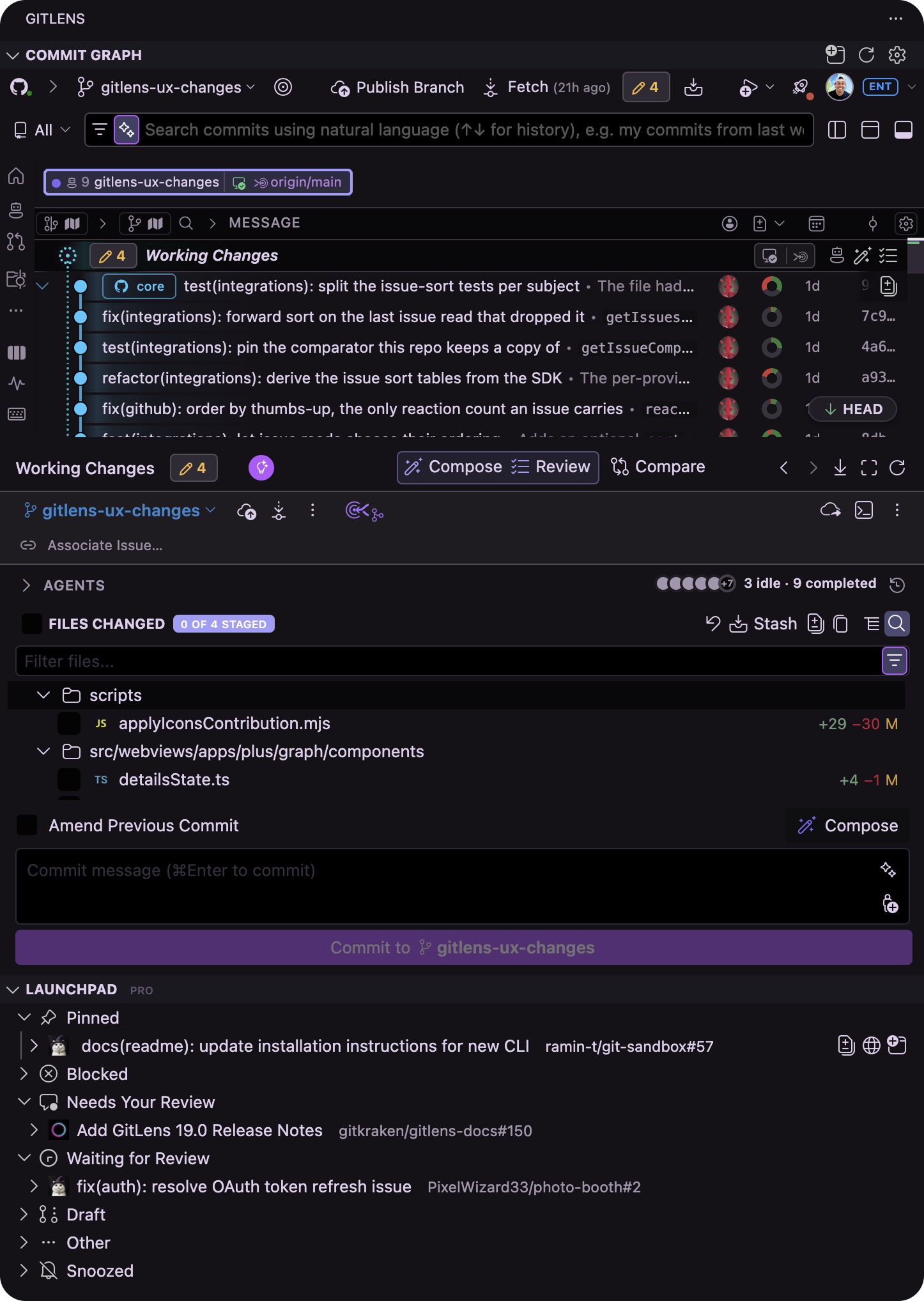
GitLens brings your repository history, working changes, branches, worktrees, pull requests, and coding agent activity into one interactive workbench inside the editor, so you can understand what changed, shape it into clean commits, and move it to merge without leaving your IDE.
GitLens Community is free and open source. GitLens Pro unlocks the Commit Graph, Worktrees, Visual History, Launchpad, agent sessions, and GitKraken AI on private repositories. The GitLens Community vs. GitLens Pro comparison lists exactly what each plan includes.
What GitLens does
GitLens covers the full arc of a change, from understanding a line of code to landing a pull request. The sections below summarize each capability and link to the page that documents it.
See everything in one place with the Commit Graph
The Commit Graph shows commits, branches, working changes, worktrees, upstream state, and supported coding agent activity in one connected view. Every row carries live state, such as ahead and behind counts and unpushed or unpulled changes, and you can act on a row directly to branch, merge, rebase, cherry-pick, stash, push, pull, or open a pull request. Commit search understands Git filters such as message:, author:, file:, and change:, and also accepts natural language.
The GitLens Commit Graph page describes the graph in full, and the Commit Graph is Home page explains how the graph replaced the earlier Home view as the starting point in GitLens.
Keep human and agent work visible
Coding agents open branches and worktrees faster than you can track by hand. GitLens shows supported agent sessions in the Commit Graph with their live status, so you can see which agents are working, idle, or waiting on you, and resume a session from the row it belongs to. Multi-worktree working-changes rows keep every parallel stream of work in view without switching branches.
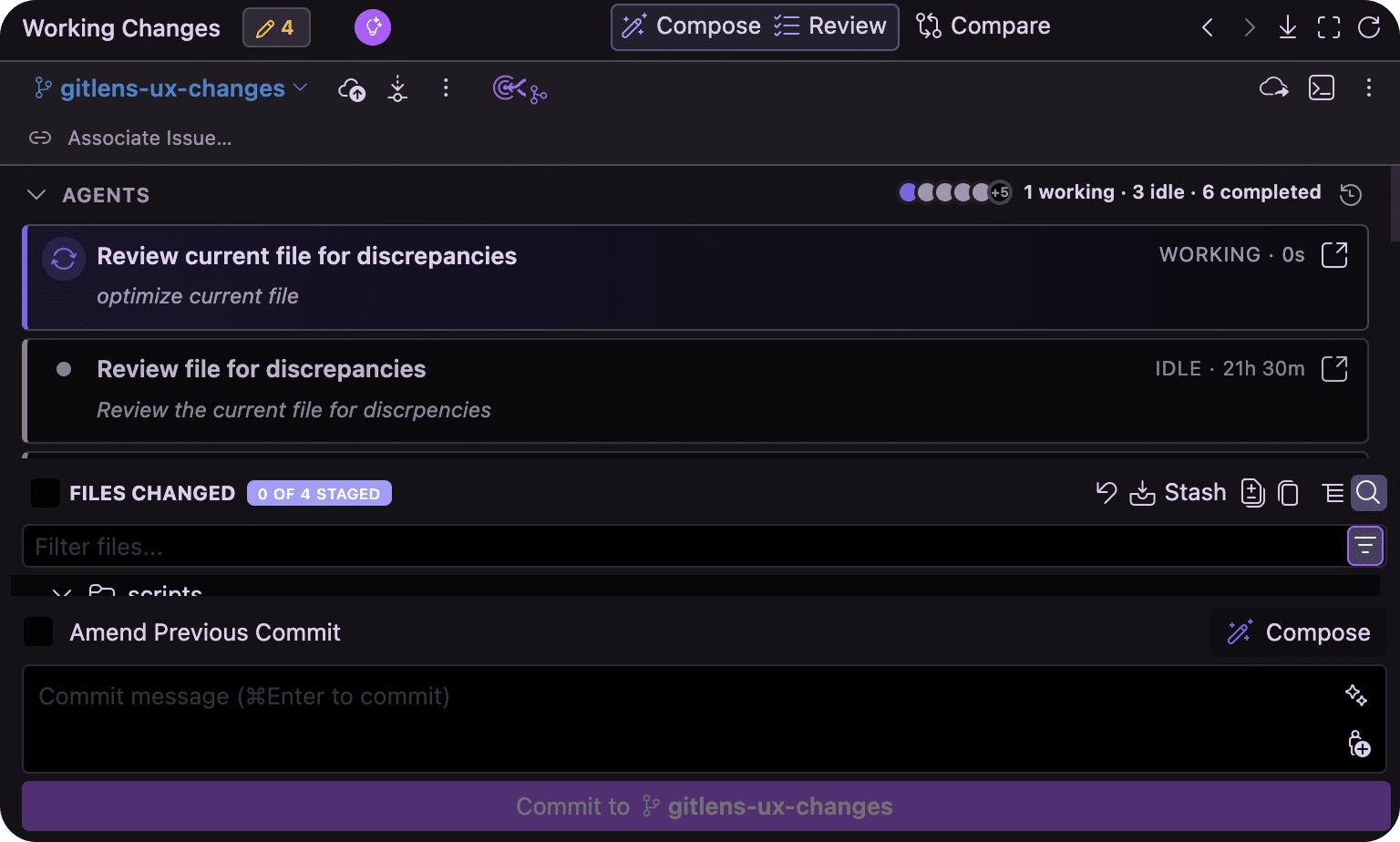
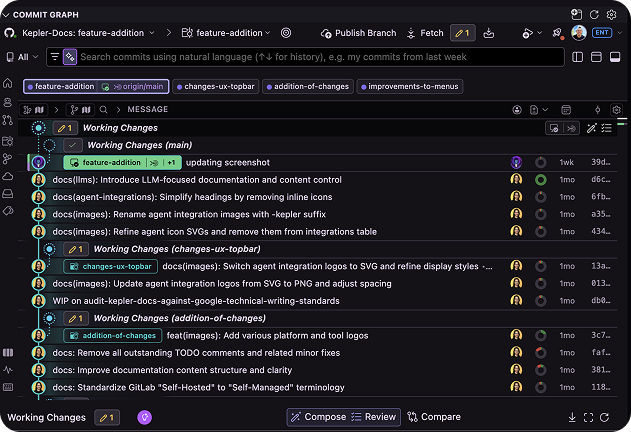
Read AI Agents in GitLens for agent sessions, Start Work with Agent, and the Agent Kanban view, and GitLens Worktrees for creating and managing worktrees.
Review, compose, and compare before you merge
From the Commit Graph, you can review a change as a whole with AI-powered Review, send findings back to your coding agent for another pass, sort a pile of working changes into separate commits with Commit Composer, and compare any two revisions. GitKraken AI also generates commit messages, stash messages, pull request descriptions, and changelogs, explains what a commit or branch did, and automates rebases and conflict resolution.
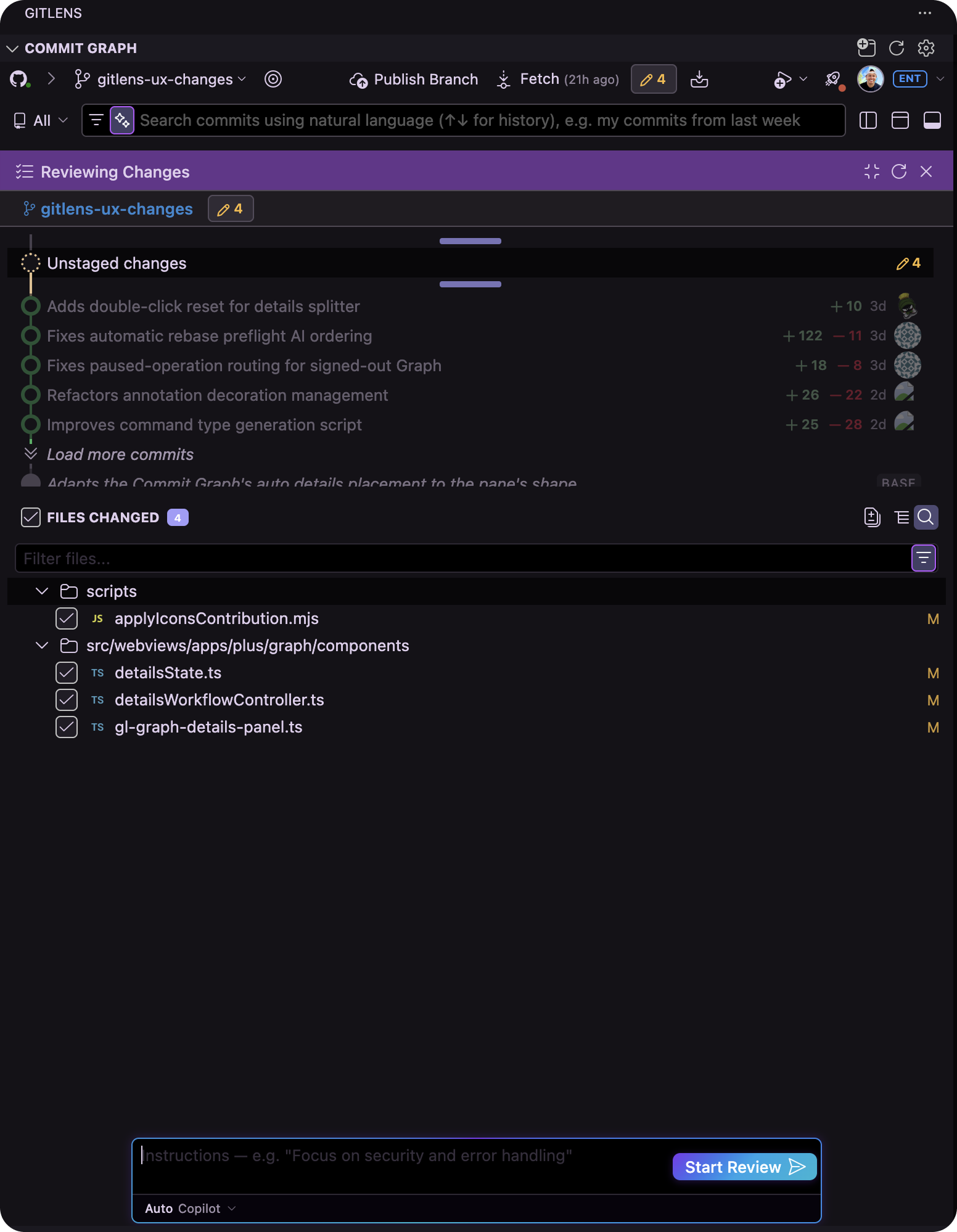
The GitKraken AI Features in GitLens page covers every AI capability, and the Commit Composer section of the features page explains how to compose commits.
Keep pull requests moving with Launchpad
Launchpad lists every pull request you are involved in and groups them by what needs to happen next: needs your review, blocked, requires follow-up, waiting for review, and draft. You can check a pull request out, open it in a worktree, or start its review with a coding agent without opening a browser tab. See the Launchpad page for setup and daily use.
Understand any line of code
The features GitLens is best known for remain free and on by default. Inline blame shows who last changed the current line and why, rich hovers add commit details, linked issues and pull requests, and quick actions, and Git CodeLens summarizes recent changes at the top of each file and code block. File History and Line History follow a file or a single line across renames, and Visual History draws a timeline of how a file or the whole repository evolved.
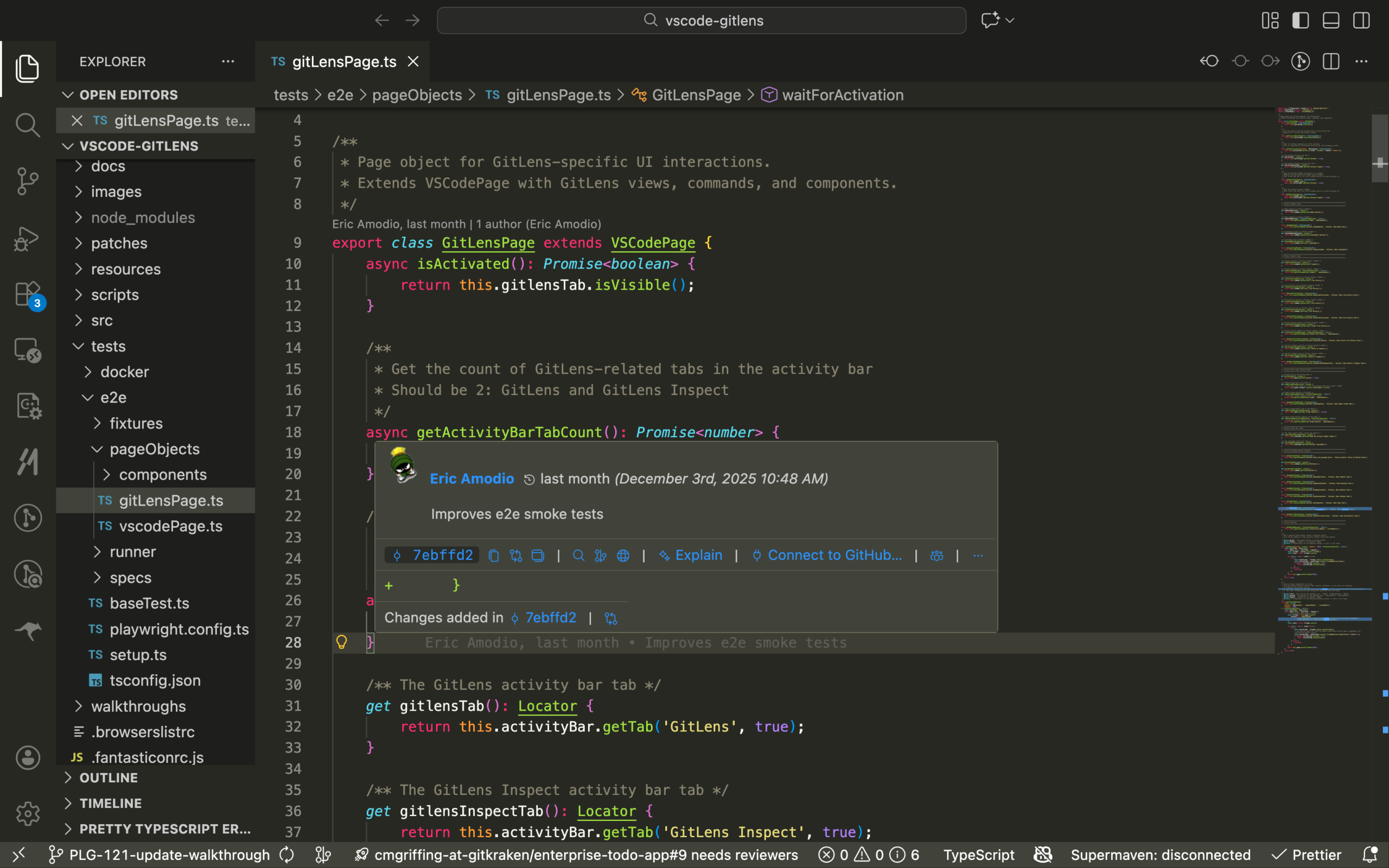
Start with GitLens Interactive Code History for blame, hovers, and Inspect, then GitLens Visual File History for the timeline view.
Connect your Git host and issue tracker
GitLens integrates with GitHub, GitLab, Bitbucket, Azure DevOps, and Jira to show pull requests and issues beside your history, correlate branches with their pull requests, and turn issue keys into links. Custom autolinks and custom remotes extend the same behavior to Gerrit, Gitea, and internal tooling. The GitLens Integrations page walks through connecting each provider.
Where to go next
Pick the guide that matches what you want to do:
| Goal | Page |
|---|---|
| Install GitLens and take a first tour | Get Started with GitLens |
| Learn the side bar views and how to arrange them | Using the GitLens Sidebar |
| Browse every feature in one reference | GitLens Features |
| Look up a setting | GitLens Settings Overview |
| Sign in or manage your plan | GitKraken Account |
| Share work without pushing a branch | GitLens Cloud Patches and GitLens Code Suggest |
| Group repositories across machines | GitLens Workspaces |
| Review how GitLens handles your data | GitLens Security Information |
| See what changed in the latest release | GitLens Release Notes |
Follow a complete workflow
These guides string several features together into one end-to-end task:
- Manage Parallel Development from the Commit Graph
- Take Agent-Generated Work from Change to Merge
- Prepare Your Branch to Ship
- Accelerate PR Reviews
- Understanding an Unfamiliar Codebase
- Cleaning Up and Preparing Work for Review
- Orchestrating Complex Git Operations
Get help
If something is not working, start with these resources:
- GitLens Troubleshooting for common problems and how to collect logs
- GitLens FAQ for frequently asked questions
- GitLens issues on GitHub to report a bug or request a feature
- GitHub Discussions for GitLens to talk with other users and the engineering team
- GitKraken Support for direct help on paid plans
