

Last updated: March 2026
Modify nested repository settings via the Manage repositories page.
-
Go to the Manage repositories configuration page and navigate to the nested repository to manage. Click
 Action ➜ Edit repository.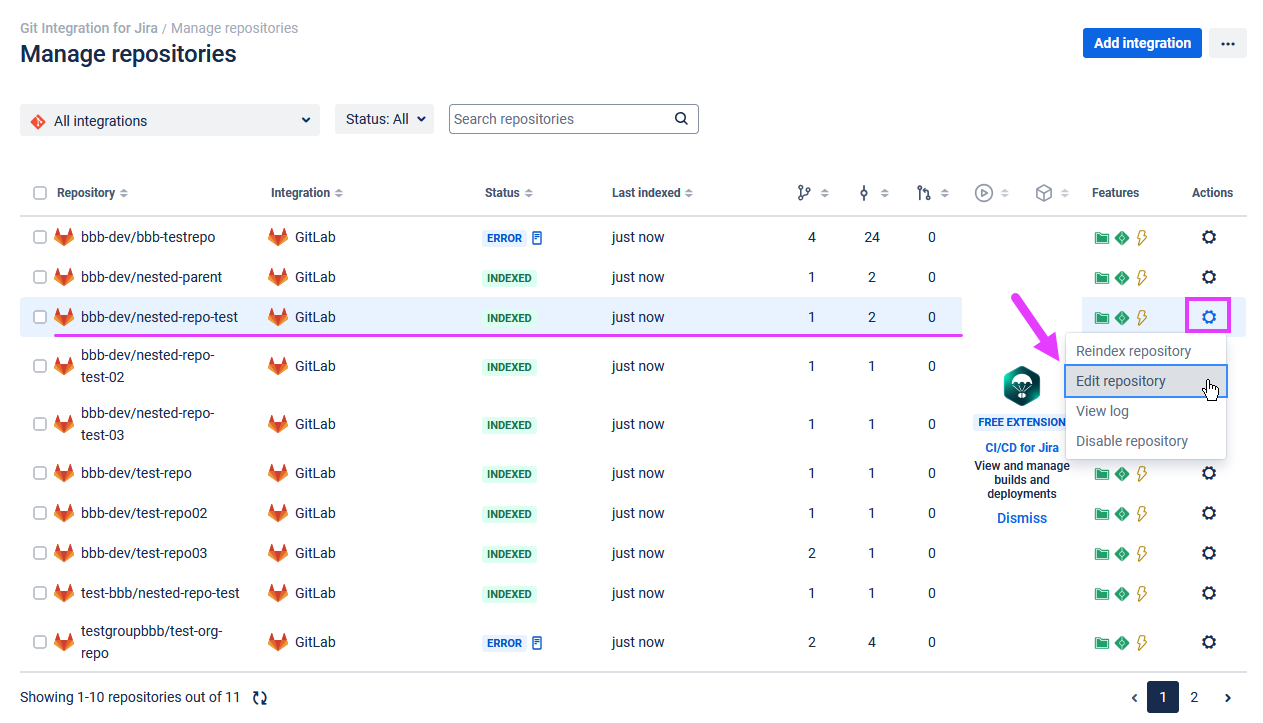
-
On the Edit repository settings page, make necessary changes to the selected nested repository and then click Save to save your changes.
For single connected nested repository integration, click Actions ➜ Edit integration to modify/update nested repository settings.
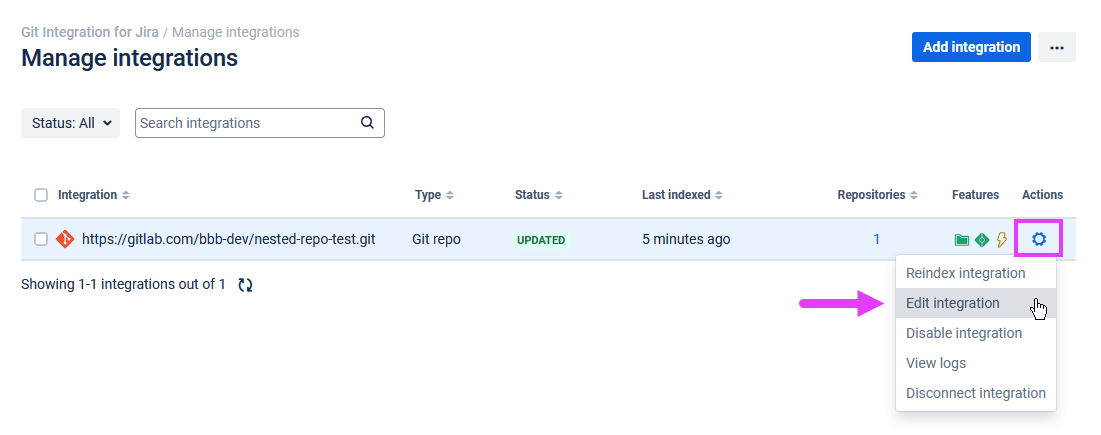
Edit Nested Repository Connection Settings
Use the options below to configure repository settings:
| Option | Description | Type |
|---|---|---|
| Display Name | This is the alias that appears in the Repository/Integration column. | HOSTED EXTERNAL |
| Repository origin | Full URL to the Git origin from where the repository was cloned. | HOSTED EXTERNAL |
| Manage credentials | This section allows you to update or modify the username and password credentials if this integration uses HTTP(S) authentication. If this integration uses SSH authentication, change or update the SSH key and passphrase (if configured). | EXTERNAL |
| SSL Verify | If set to Disabled, Git Integration for Jira ignores verification of SSL certificates when connecting to a remote Git server. |
EXTERNAL |
| Main Branch | Set the main branch. Default is master. |
HOSTED EXTERNAL |
| Indexing triggers | This is the webhook URL that you can use to set up webhook indexing triggers for this integration. | HOSTED EXTERNAL |
| Tags | Set whether to show all tags or show only tags with matching regex pattern. For more information on git tags, see Git tags. | HOSTED EXTERNAL |
| Smart Commits | Allows or disallows users to use the smart commits feature. | HOSTED EXTERNAL |
| Project Permissions: Restrict to projects | The default setting is Associate with all projects. You can restrict access to the Repository Browser and Git Commit tabs (Advanced) for the selected repository by setting the project associations. | HOSTED EXTERNAL |
| Web Linking | Optional.
The web linking feature adds links to your git hosting provider directly into the Git Commits tab. For special integrations (Auto-Connect), this feature is configured automatically. For more information, see Web linking. |
HOSTED EXTERNAL |
Prev: Edit repository settings
More Related Topics About Managing Repository/Integration Configuration
Managing integration or repository configuration (Git Integration for Jira Cloud)
Managing integrations via Actions (Jira Cloud) (Git Integration for Jira Cloud)
Edit integration settings (Git Integration for Jira Cloud)
Edit repository settings (Git Integration for Jira Cloud)
Edit nested repository settings (this page)
SSL verify (Git Integration for Jira Cloud)
View repository indexing logs (Git Integration for Jira Cloud)
Disconnect an integration or repository configuration (Git Integration for Jira Cloud)
Disconnect a nested repository configuration (Git Integration for Jira Cloud)
Associating project permissions (Git Integration for Jira Cloud)
