

Last updated: March 2026
Signals highlights sprints or issues not progressing as expected, drawing attention to potential delays. Managers can activate or deactivate risk alerts based on project requirements. Each risk has a configurable severity level that indicates its impact on the project.
When issues or sprints reach predefined thresholds, visual alerts appear on the timeline showing the risk severity. Use these alerts to assess, classify, and prioritize potential impacts on your project.
This page explains how to configure Risk View Settings to highlight the risks that require immediate attention.
Configuring sprint risks
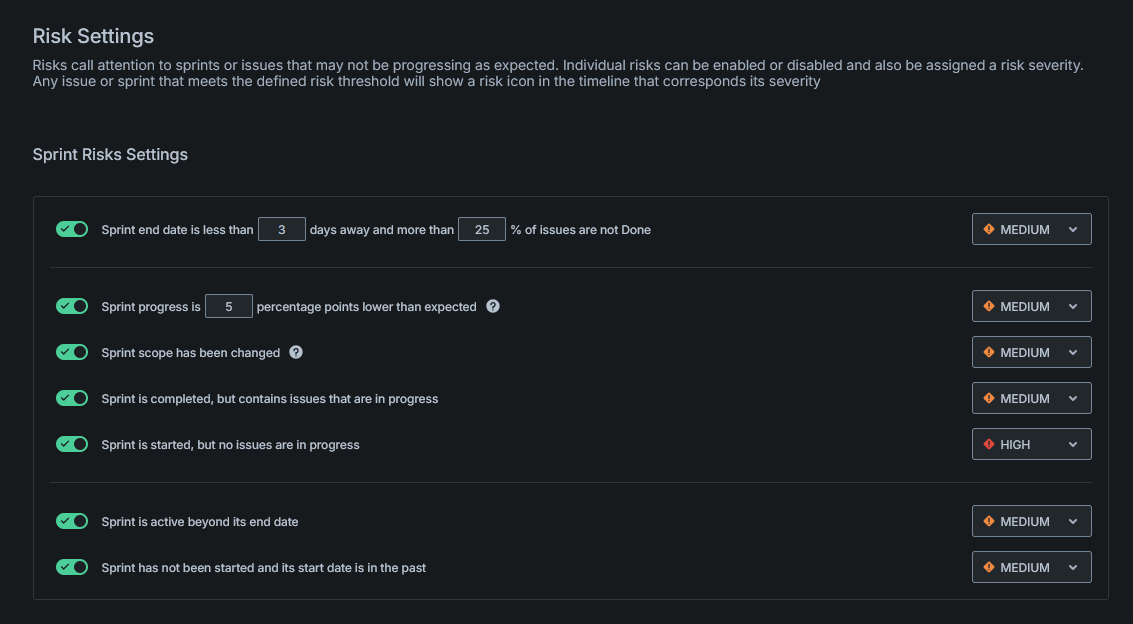
Sprint risks alert you to approaching deadlines, behind-schedule progress, scope changes, overdue sprints, and pending sprints past their start date.
To configure severity levels for each risk type, use the dropdown menu next to each setting.
Sprint end date approaching with incomplete issues
This risk triggers an alert when the sprint ends in fewer than # days with more than #% of issues incomplete.
Use this setting to identify sprints that may not complete all planned work.
Sprint progress behind schedule
This risk triggers an alert when actual progress falls # percentage points below expected progress.
Expected progress calculates as: completed issues ÷ total issues ÷ sprint duration. For example, a 14-day sprint with 14 issues expects one completed issue per day.
Sprint scope changed
This risk triggers an alert when issues are added or removed after the sprint starts.
Use this setting to track scope creep and ensure sprint boundaries remain consistent.
Completed sprint with in-progress issues
This risk triggers an alert when a completed sprint contains issues that remain in progress.
Use this setting to identify work that may have been overlooked at sprint completion.
Sprint active past end date
This risk triggers an alert when sprints remain active past their scheduled end date.
Use this setting to identify overdue sprints that need closure or extension.
Sprint not started past start date
This risk triggers an alert when sprints have not started and their scheduled start date has passed.
Use this setting to identify delayed sprint kickoffs.
Configuring issue risks
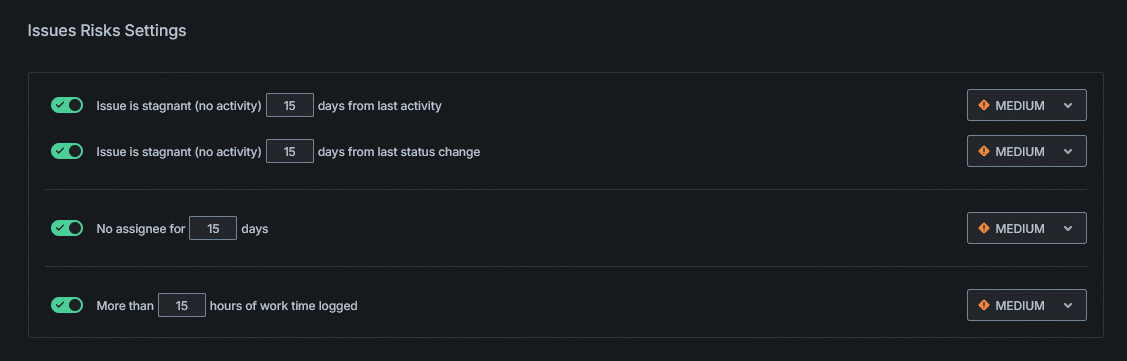
Issue risks alert you to inactivity, missing assignees, or excessive logged hours on individual issues.
To configure severity levels for each risk type, use the dropdown menu next to each setting.
Stagnant issue (no activity)
This risk triggers an alert when issues have no activity for # days.
Use this setting to identify abandoned or forgotten issues.
Stagnant issue (no status change)
This risk triggers an alert when issues have no status change for # days.
Use this setting to identify issues stuck in a single state.
Unassigned issue
This risk triggers an alert when issues have no assignee for # days.
Use this setting to identify work that lacks ownership.
Excessive logged time
This risk triggers an alert when logged time exceeds # hours.
Use this setting to identify issues consuming more effort than expected.
Configuring pull request risks

Pull request risks alert you to code reviews that may be stalling development progress.
Inactive pull request
This risk triggers an alert when pull requests have no activity for # days.
Use this setting to identify code reviews that need attention or may be blocking other work.
More on Signals
