

Last updated: April 2026
This FAQ answers common GitKraken Desktop questions about supported platforms, account and plan limits, authentication, remote access, and troubleshooting. Use it when you need a quick answer or constraint check before opening a longer feature guide, especially for Linux support, SSH behavior, proxy issues, or subscription-related questions.
Key facts
- Supported Linux distributions: Ubuntu 18.04 LTS+, RHEL 8+, and Fedora 39+
- Multiple accounts: Supported with a paid license by using Profiles
- SSH limitation: GitKraken does not use
~/.ssh/config - Windows SSH note: Pageant is the supported SSH agent on Windows
- Community status troubleshooting: Verify that you are signed in with the email associated with your subscription
| Topic | Current answer |
|---|---|
| Supported Linux distributions | Ubuntu 18.04 LTS+, RHEL 8+, Fedora 39+ |
| Multiple accounts | Supported with a paid license by using Profiles |
~/.ssh/config support |
GitKraken Desktop does not use ~/.ssh/config |
| Windows SSH agent | Pageant is the supported SSH agent on Windows |
| Subscription shows Community | Verify that you are signed in with the email associated with your subscription |
Need a quick reference? These resources may help:
Common coding agent and worktree questions
What is Agent Sessions View?
Agent Sessions View is a Left Panel mode in GitKraken Desktop that organizes worktrees around coding agent sessions, status, and quick actions. For more information, see Coding Agents in GitKraken Desktop.
Can I run multiple coding agent sessions at the same time?
Yes. Each coding agent session runs in its own worktree and working directory, so you can run parallel sessions in the same repository.
Can I use a coding agent that GitKraken Desktop does not explicitly integrate with?
Yes. GitKraken Desktop explicitly integrates with supported coding agent CLIs such as Claude Code, Codex CLI, Copilot CLI, Gemini CLI, and OpenCode, but you can still run other coding agents manually in the embedded terminal. For more information, see Coding Agents in GitKraken Desktop and GitKraken Terminal Guide.
Do List view and Agent Sessions View show different worktrees?
No. They show the same underlying worktrees. List view is reference-focused, while Agent Sessions View is agent-focused. For more information, see Manage Git Worktrees in GitKraken Desktop.
Are Agent Sessions View and coding agent workflows available for on-prem customers?
Yes. On-premises deployments use the same GitKraken Desktop client for local Desktop workflows such as worktrees, Agent Sessions View, and terminal-based coding agent workflows. Availability of cloud-dependent services still depends on the deployment and environment. For more information, see Set Up GitKraken Self-Hosted Server (On-Premise) and GitKraken On-Premise Serverless (Stand-Alone) Setup.
Common feature and interface questions
Does GitKraken support TFS, Visual Studio Team Services, or Azure DevOps?
Yes. GitKraken integrates with Azure DevOps. For TFS, clone the repository manually using File > Clone Repo and provide the HTTPS URL. On Mac or Linux, enable Basic Authentication in IIS for TFS. Consider using a Personal Access Token (PAT) if password authentication fails.
More info: SSH and HTTPS authentication
What Linux distributions are supported?
GitKraken supports:
- Ubuntu 18.04 LTS+
- RHEL 8+
- Fedora 39+
Other distributions may work but are not officially supported.
Can I use multiple GitHub/GitLab/Bitbucket/Azure DevOps accounts?
Yes—with a paid license. Use Profiles to configure separate integrations for each account.
How do I change my commit avatar?
Your avatar is linked to your .gitconfig email address via Gravatar. Update your Gravatar to change your displayed avatar.
Can I use GitKraken on multiple computers?
Yes. Subscriptions are linked to your email address, not a specific machine.
Why can’t I see remotes under the integration drop-down?
The drop-down only shows forks. Use the URL option to add other remotes.
How do I push a local project to GitHub or other remotes?
- Initialize a new project remotely.
- Open your local project.
- Add the new project as a remote.
- Set your branch’s upstream.
- Push and confirm the Force Push prompt.
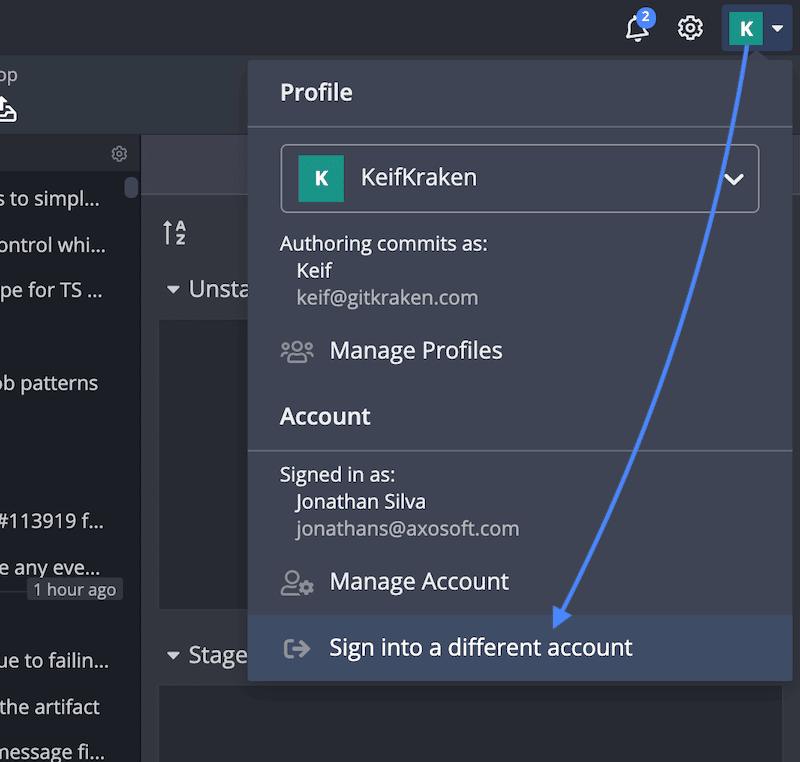
How do I sign out of GitKraken?
While there’s no sign-out button, you can:
- Click your profile icon → Sign into a different account
- Or delete the
~/.gitkrakenfolder to reset data
Common technical troubleshooting questions
Why am I getting a repo compatibility error?
Try closing other tools like IDEs, then relaunch GitKraken. Use git status to check for uncommitted changes. Try switching branches or cloning to a new directory.
Why won’t GitKraken launch on Linux?
Launch from terminal to check for missing dependencies. Refer to the installation guide.
Why does my subscription show COMMUNITY?
Verify that you’re logged into the email associated with your subscription. Check this via your profile icon.
Why isn’t GitKraken authenticating my SSH key?
- Confirm remote URLs start with
ssh://or{user}@{host}:{repo}. - GitKraken does not use
~/.ssh/config. Load the key manually or use your OS agent. - On Windows, only Pageant is supported. Download here.
Why can’t GitKraken access my GitHub remote?
- Confirm GitKraken is authorized.
- Org access may require approval from the owner. Request access.
Why can’t GitKraken connect to the internet (firewall or proxy)?
- GitKraken works with most firewalls but some PACs or proxy settings may need manual config.
- Use
http.proxyorremote.<name>.proxyin Git config. See Authentication.
Why is the graph missing commits or showing errors?
Run git gc in terminal or clone into a fresh directory.
Why is the window blank or UI not displaying properly?
Launch GitKraken with:
gitkraken --disable-gpuWhy is my file encoding incorrect or unreadable?
Set encoding to UTF-8 or use GUESS ENCODING under repository preferences.
How can I enable extended logging for troubleshooting?
- Close GitKraken
- Rename or delete
~/.gitkraken/logs - Start GitKraken using:
gitkraken -d SILLY - Reproduce the issue
- Logs will be saved in the new
logsfolder
I can’t select repo folders on Ubuntu 20.04 or prior versions. How do I fix this?
This is due to a known Electron issue. Start GitKraken with:
gitkraken --xdg-portal-required-version=3