

Last updated: March 2026
This page provides solutions for recovering from corrupted integration configuration files.
Problem
Our technical team discovered corrupted files in some customer integrations. These files contain information about integrations and repositories only. No customer data was lost.
While investigating the root cause, the team identified a recovery path using backups.
Diagnosis
Two cases can occur:
- Integration configuration disappears completely.
- Integration configuration exists but indexing errors appear related to JSON parsing.
Cause
Unexpected file corruption of the JSON file that stores integration and repository configuration (integration name, commit/pull/merge counter, etc.).
Solutions
Case 1: Integration disappears completely
-
Connect and set up the required integration again. Large integrations may take several hours to index all repositories.
-
If you use the Jira Development Info feature, prevent data duplication:
a. Disable all integrations.
b. Go to GIJ General settings ➜ Advanced section.
c. Click Clear Development Information.
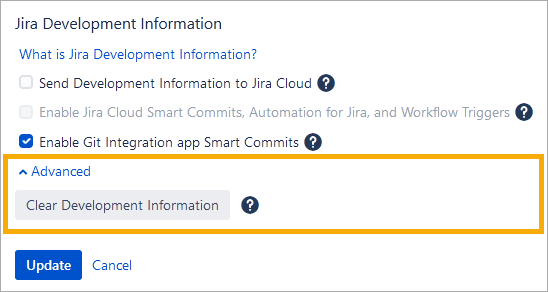
d. Enable all integrations.
-
After completing these steps, notify the GIJ support team that data restoration is not required. Otherwise, data duplication will occur if we restore data on our side.
Case 2: Integration exists but indexing errors appear
Error message: “Error of converting a string to java.util.HashMap<java.lang.String, java.util.Collection
-
Remove or disconnect the affected integration.
-
Connect and set up the affected integration again. Large integrations may take several hours to index all repositories.
-
After completing these steps, notify the GIJ support team that data restoration is not required. Otherwise, data duplication will occur if we restore data on our side.
